Car Scanner OBD2 ELM: Obd Mary
WyspaTechAuto & Vehicles
4.61.14K Reviews
- Version
- 1.324
- Installs
- 1.00M
- Age Rating
- Everyone
Screenshots
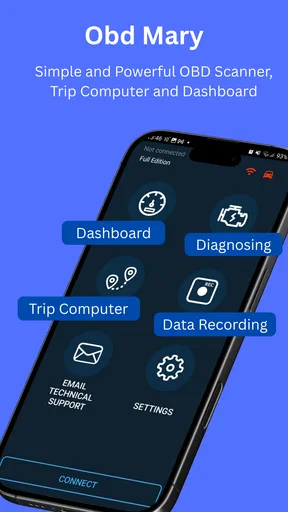
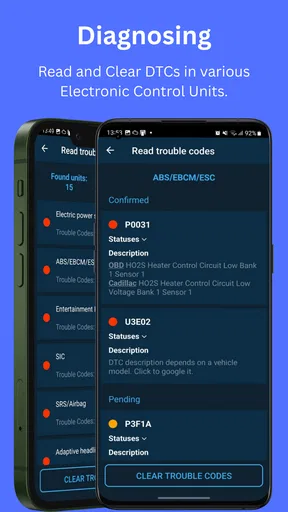
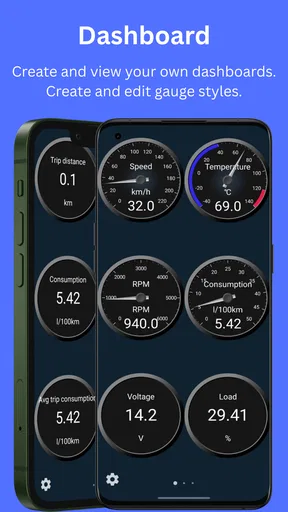
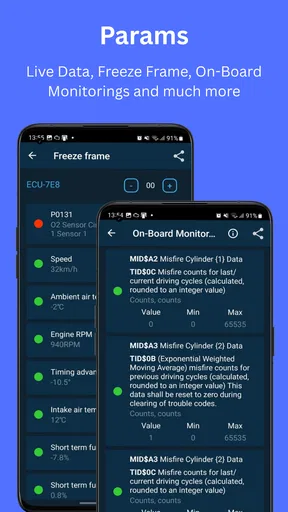
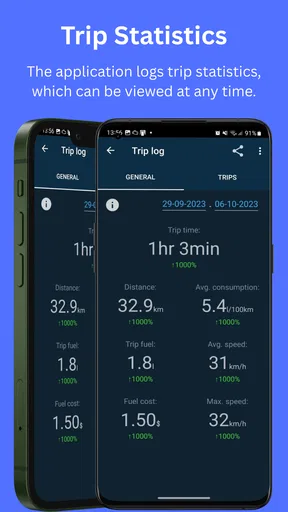
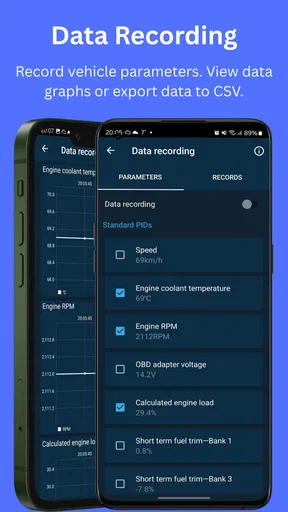
Our Review of Car Scanner OBD2 ELM: Obd Mary
 Analysis by Appyee
I approached Car Scanner OBD2 ELM: Obd Mary as a tool for the moments when a dashboard warning appears and I want more information before deciding what to do next. It is a free Auto & Vehicles app from WyspaTech, built around OBD2 diagnostics, trouble-code reading, a customizable dashboard, and trip-computer functions through a compatible ELM adapter. After using it beyond the initial novelty, I found that its real value depends less on how impressive the first scan feels and more on whether you have a practical reason to check your car regularly.
The app has a 4.6 average from around 147 thousand ratings, with more than a million installs. Those figures make sense to me: it is approachable enough for a curious driver, but it also offers enough information to become part of a basic maintenance routine. Still, it is important to understand its role. This is a diagnostic companion, not a replacement for a mechanic, a workshop scan tool, or a guaranteed explanation for every fault.
From an interesting first scan to a useful driving habit
The first week is where the app makes its strongest impression. Pairing a phone with an ELM-compatible OBD2 adapter and seeing live vehicle information on screen feels immediately useful, especially if you have never had access to diagnostic data before. The interface gives a clearer starting point than simply guessing from a warning light, and the custom dashboard lets you choose the readings that matter most to your own driving.
I particularly like the idea of treating the dashboard as a small information workspace rather than leaving every available value visible. A commuter might prioritize engine-related readings and trip information, while someone checking a used car may prefer a compact screen for observing behavior during a test drive. The ability to arrange the display around a specific purpose is more valuable than a crowded screen full of numbers.
The DTC scanner is the feature most people will try first. Reading a diagnostic trouble code can help answer a basic question: is this something I can investigate calmly, or should I stop treating it as a minor inconvenience? That distinction matters. A code can point toward a system or condition, but it does not automatically identify the failed part. I would use the result to guide the next conversation with a mechanic, not to order a replacement component immediately.
There is also a useful psychological benefit during the first week. Instead of reacting blindly to a warning, you can record what appeared, note how the car behaved, and compare that information with later scans. That turns a vague problem into a small investigation. The app is at its best when it supports that process rather than encouraging instant conclusions.
The ELM trip-computer side gives the app a second identity. It is not only something I would open when a warning light appears; it can also become a driving companion for trips where I want to observe journey information. This makes the app more likely to survive after the first diagnostic experiment, because it has a reason to remain installed even when the car is behaving normally.
That said, the initial setup is not completely frictionless. The phone, adapter, vehicle, and connection method all have to cooperate. A reader who expects to install the app and receive professional-level information without any hardware or compatibility considerations may be disappointed. The app is free, but the overall experience still depends on the quality and suitability of the adapter you use with it.
What the app can tell you before a repair visit
A realistic everyday scenario is a check-engine light appearing on the way home. I would park safely, connect the adapter, open the scanner, and read the code rather than repeatedly restarting the car and hoping the light disappears. I would then write down the code, the driving symptoms, and whether the warning remained active. That small record is more useful than saying only that “the car felt strange.”
Another practical use is checking a car before a long journey. A scan cannot certify that a vehicle is roadworthy, but it can reveal stored or current diagnostic information that deserves attention. I would combine it with ordinary checks such as fluids, tires, lights, and visible leaks. The app adds electronic context; it does not replace physical inspection.
For someone considering a used vehicle, the tool may be helpful during a broader evaluation, but I would not treat a clean scan as proof that the car has been perfectly maintained. Faults can be intermittent, recently cleared, outside the information available through a generic OBD2 connection, or unrelated to the areas a buyer is most concerned about. The sensible workflow is to use the app as one piece of evidence and still arrange an independent inspection.
One of the less obvious strengths is that live readings can help you notice patterns instead of focusing on a single snapshot. If a value changes alongside a symptom, that relationship may give a technician a better starting point. The important habit is to observe under comparable conditions: similar engine temperature, similar route, and similar load. Randomly checking numbers without context can create more confusion than insight.
Why the first month matters more than the first afternoon
After the novelty fades, the app has to earn its place through recurring usefulness. For me, that comes from three habits: scanning when a warning appears, checking before demanding trips, and keeping a simple personal note of unusual behavior. The app does not need to be open every day to justify itself. It needs to be available when a question about the car becomes important.
The custom dashboard can support a monthly check if it is kept deliberately simple. I would choose a few readings that help me understand the vehicle during normal driving, then avoid constantly redesigning the screen. Customization is useful when it reduces distraction and makes familiar information easy to find. It becomes counterproductive when the dashboard turns into a collection of values I never interpret.
The trip-computer functions may provide more regular reasons to open the app than diagnostics alone. Drivers who enjoy comparing journeys, observing trip behavior, or keeping an eye on vehicle information may find that the app becomes a lightweight companion rather than an emergency-only utility. Drivers who rarely look at trip data may never develop that habit, and for them the app’s long-term value will rest almost entirely on the scanner.
I also see a good role for it in shared households. If more than one person uses the same car, a scan result can be documented and discussed instead of being passed along as an uncertain verbal description. One person can note when the light appeared, another can check whether it returned, and a mechanic can receive a more precise account. This is not a glamorous feature, but it is the kind of workflow that makes a diagnostic app genuinely useful over time.
The app is available at no purchase price, which lowers the barrier to trying it. Optional in-app purchases range from about two dollars to around nineteen dollars per item, so I would examine the available upgrade choices carefully rather than assuming every driver needs them. The free entry point is enough to decide whether the connection process and information style suit you before spending more.
For a person who wants a one-time scan and then plans to uninstall the app, the free access may be all that matters. For a driver who intends to use custom displays or trip information repeatedly, the decision should be based on actual routine rather than curiosity. I would use the app for a while first, identify which functions I return to, and only then consider whether an optional purchase improves that routine.
The maintenance burden is modest, but real
Keeping the app useful requires more than leaving it installed. The adapter needs to be available, the phone needs enough battery for the intended drive, and the connection needs to be established before relying on live information. That setup is manageable, but it is still a small ritual. If you dislike pairing devices or troubleshooting a connection in a parked car, you may stop using the app even if its diagnostic features are good.
There is also a responsibility to interpret results carefully. A code should be saved with the circumstances around it: when it appeared, what the car was doing, whether performance changed, and whether the light stayed on. This is one of the most important long-term tips I can offer. The app becomes more valuable when it produces a history of observations, not when it is used as a button that delivers an isolated label.
Compatibility deserves attention before building a routine around the app. The phone requirement is Android 6.0 or later, and the vehicle connection depends on the OBD2 system and the ELM adapter. Even when a car has a diagnostic socket, the information exposed through a generic connection can vary by vehicle. I would test the complete setup while the car is stationary and before an urgent trip.
The current release is version 1.324, and the app was released on March 13, 2019. Those details suggest a product with an established presence rather than a brand-new experiment, while the large install base indicates that many drivers have tried it. They do not remove the need to keep expectations realistic. A mature app can still feel too technical for one driver and too limited for another, depending on the car and the desired depth of diagnosis.
Safety is another maintenance issue. I would configure the display before driving and avoid interacting with the phone while the vehicle is moving. Live data is interesting, but no reading is worth creating a distraction. The best routine is to connect while parked, start the trip with the screen already arranged, and review details only after stopping.
Where repeated use starts to feel tiring
The biggest source of fatigue is the gap between having data and knowing what to do with it. Beginners may see a code and expect a direct repair instruction, while experienced users may want deeper manufacturer-specific information than a general OBD2 tool can provide. The app sits between those two expectations. It is more informative than a warning light alone, but it is not a complete workshop diagnostic system.
Connection friction can also wear down enthusiasm. If the adapter is unreliable, if the phone does not connect consistently, or if the car exposes limited information, frustration may be blamed on the app even when the real issue is the hardware or vehicle. This is why I would not judge the product after one failed attempt. I would test the adapter separately where possible, confirm the car’s socket and ignition behavior, and retry with the vehicle safely parked.
Another fatigue point is dashboard overload. Customization encourages experimentation, but too many gauges can make the screen harder to read and the information less meaningful. I would create one layout for ordinary trips and another for a specific diagnostic observation only when necessary. A focused dashboard is easier to remember and less likely to turn driving into an exercise in monitoring.
There is a similar risk with trip data. Tracking every journey can sound appealing, yet many people lose interest when the information does not change a decision. I would keep the trip computer if it helps with a real habit, such as comparing recurring routes or observing a vehicle during a particular period. If it becomes another screen I glance at without acting on, it is reasonable to stop using that part of the app.
The app is not the right choice for someone who needs guaranteed professional diagnosis, advanced service procedures, or a complete inspection of every electronic module. In those cases, a workshop-grade scanner or qualified technician is the better option. It is also not ideal for a driver who wants a completely automatic experience with no adapter setup. The strongest audience is someone willing to learn a little, check information responsibly, and accept that generic diagnostics have boundaries.
Does it deserve a permanent place on the phone?
In my experience, Car Scanner OBD2 ELM: Obd Mary earns lasting space when the owner treats it as part of a sensible maintenance routine. Its recurring value comes from being ready before a warning becomes a crisis, helping organize observations, and making ordinary trips more informative for people who enjoy that level of detail. It is not necessary to open it constantly. Its usefulness is concentrated in the moments when vehicle information can improve a decision.
I would recommend it to drivers who already have, or are willing to buy, a compatible ELM adapter; people preparing for longer journeys; owners who want a clearer conversation with a mechanic; and curious motorists who like understanding what their car is reporting. The free starting point makes experimentation easy, while the Everyone age rating keeps it accessible to a broad audience.
I would skip it if you expect a scan to name the exact failed part every time, if you need manufacturer-level service functions, or if connecting hardware sounds more annoying than helpful. A basic warning-light reader may be enough for occasional curiosity, while a professional diagnostic service is more appropriate for complicated faults. Choosing the simpler or more advanced alternative is not a criticism of this app; it is a matter of matching the tool to the job.
My final view is positive but measured. WyspaTech has made a practical bridge between a car’s hidden diagnostic information and an ordinary phone. The custom dashboard and trip-computer angle give it more staying power than a single-purpose code reader, but the app still depends on compatible hardware, careful interpretation, and a driver who will use the information thoughtfully. Its lasting value is not the excitement of the first scan; it is the small amount of clarity it can add to repeated maintenance decisions.
Verdict
Strengths of Car Scanner OBD2 ELM: Obd Mary
- Supports many ELM327 Bluetooth and Wi‑Fi adapters.
- Live sensor data helps monitor engine performance in real time.
- Can read and clear diagnostic trouble codes on compatible cars.
- Trip data and fuel statistics are useful for everyday driving.
- Customizable dashboards make frequently used readings easy to access.
Limitations of Car Scanner OBD2 ELM: Obd Mary
- Some advanced features require an in-app purchase or subscription.
- Compatibility varies by vehicle, adapter quality, and connection type.
- Incorrect readings may appear with low-quality or clone ELM327 adapters.
- The interface can feel technical and overwhelming for beginners.
- Certain manufacturer-specific functions are unavailable on many vehicles.
Similar Picks in This Category
View All
Android Auto
Google LLC4.1

maxim — order a taxi & food
PT. SITO4.7

Штрафы ГИБДД: проверка с фото
Pays LLC – Штрафы ГИБДД4.7

Номерограм – проверка авто
Авто Ассист4.8

Дром Авто
Дром4.9

Frequently Asked Questions
What is Car Scanner OBD2 ELM: Obd Mary used for?
Car Scanner OBD2 ELM: Obd Mary is a vehicle diagnostic app designed to communicate with a car through a compatible ELM327 OBD2 adapter. It can display live engine data, read diagnostic trouble codes, and help users understand possible issues with systems monitored through the vehicle’s OBD2 port. It is mainly intended for basic monitoring and preliminary troubleshooting rather than replacing professional mechanical inspection.
What equipment is required to use Obd Mary?
The app normally requires an ELM327-compatible OBD2 adapter, which plugs into the diagnostic port of a compatible vehicle. Depending on the adapter and phone, the connection may use Bluetooth, Wi-Fi, or another supported wireless method. Before downloading, users should check that their vehicle has an accessible OBD2 port and that their smartphone supports the adapter’s connection type.
Can Car Scanner OBD2 ELM: Obd Mary diagnose every car problem?
No. Obd Mary can access information made available through the vehicle’s OBD2 system, such as certain engine and emissions-related codes, live sensor readings, and other supported parameters. However, it may not communicate with every control module or identify mechanical problems that do not generate electronic fault codes. Results can also vary according to the vehicle, adapter quality, and app compatibility.
Is Obd Mary suitable for beginners?
The app can be useful for beginners because it provides access to diagnostic codes and live vehicle information without requiring a professional scan tool. Nevertheless, some readings and code descriptions may be difficult to interpret without automotive knowledge. Users should avoid clearing a warning light simply to hide the symptom and should consult a qualified mechanic when a fault is serious, persistent, or related to safety.
Is Car Scanner OBD2 ELM: Obd Mary free to use?
Availability of features may depend on the app version, platform, and any optional purchases or premium functions offered by the developer. Basic installation or diagnostic access may be available at no cost, while advanced tools, expanded data displays, or additional features could require payment. Users should review the current store listing, permissions, subscription details, and in-app purchase information before downloading.
